
PH8 Deposit – How to Deposit Money on PH8 via GCash

PH8 offers several payment methods for users in the Philippines, making it convenient to fund an account through different channels. Among these options, GCash is a popular choice because the process is simple and can be completed directly from a mobile phone. Users may also consider Maya or USDT, depending on their preferred payment method.
This guide explains how to deposit money into PH8 using GCash and provides a comparison of GCash, Maya, and USDT to help you understand the differences.
What Is GCash?
GCash is a widely used mobile wallet in the Philippines that supports various payment and money-transfer services. When depositing to PH8 through GCash, users can complete the transaction directly from their mobile device without using a bank card.
The basic process is:
Log in to PH8 → Select Deposit → Choose GCash → Enter the Amount → Confirm Payment → Check Your Balance.
Note: Button names, deposit limits, and verification requirements may vary depending on the current PH8 interface and available payment services.
PH8 Deposit Method Comparison
| Payment Method | Convenience | Processing Speed* | Suitable For | Rating |
|---|---|---|---|---|
| GCash | ⭐⭐⭐⭐⭐ | Fast | Philippine users and mobile payments | ⭐⭐⭐⭐⭐ |
| Maya | ⭐⭐⭐⭐ | Fast | Users who already use Maya | ⭐⭐⭐⭐ |
| USDT | ⭐⭐⭐ | Depends on the network | Users familiar with cryptocurrency | ⭐⭐⭐⭐ |
*Actual processing times may vary depending on PH8, the payment provider, the blockchain network, and transaction conditions.
How to Deposit to PH8 via GCash
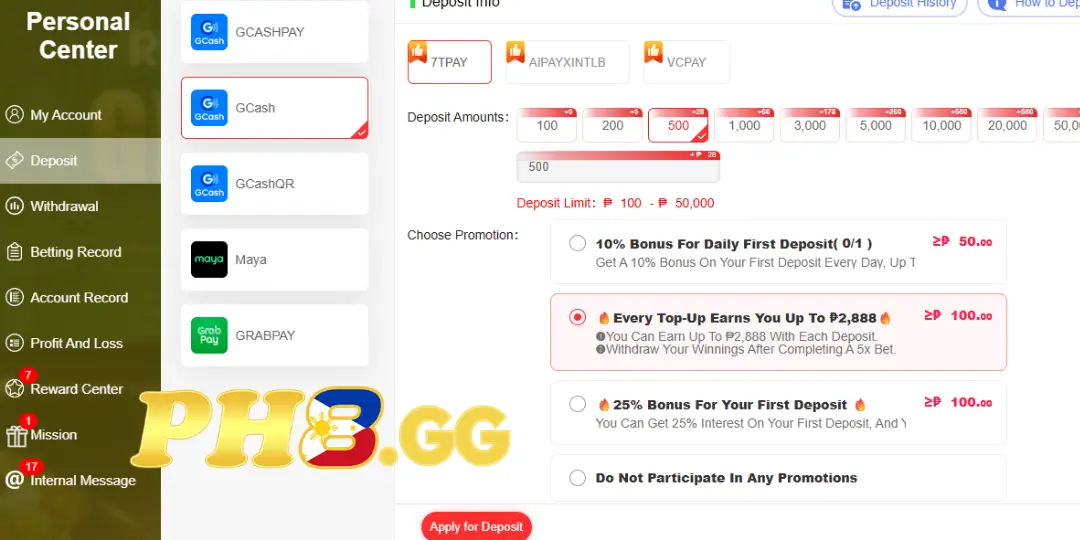
Step 1: Log In to Your PH8 Account
Visit the official PH8 website and log in using your account credentials.
After logging in successfully, check your account information before starting the deposit process.
Step 2: Select Deposit
From your account dashboard, find Deposit or Deposit Money.
The system will display the payment methods currently available. Select GCash to continue.
Step 3: Enter the Deposit Amount
Enter the amount you want to deposit into your PH8 account.
Before proceeding, carefully check:
- Deposit amount
- Selected payment method
- Recipient information
- Applicable transaction limits
- Available promotions or bonuses
Step 4: Complete the Payment via GCash
After confirming the deposit details, follow the instructions provided by PH8 to complete the payment through GCash.
If the system provides a QR code or recipient information, carefully verify the details before confirming the payment in the GCash app.
Do not send money to a phone number or account that is not provided through the official PH8 deposit process.
Step 5: Check Your Transaction
Once the payment has been completed, return to your PH8 account and check your balance.
If the funds are not credited immediately, keep your GCash transaction receipt or reference number so it can be provided to PH8 customer support for verification.
==>Read more Guide : Withdrawa Ph8
How to Deposit to PH8 via Maya
Maya is another e-wallet option available to users in the Philippines.
The basic process is similar to GCash:
- Log in to PH8.
- Select Deposit.
- Choose Maya.
- Enter the deposit amount.
- Check the payment information.
- Confirm the transaction.
- Check your PH8 balance.
Maya can be convenient for users who already regularly use the wallet and prefer to manage their transactions through the same application.
How to Deposit to PH8 Using USDT
USDT is another option for users who are familiar with cryptocurrency transactions.
When using USDT, pay particular attention to the blockchain network. A USDT address on one network may not be compatible with another network.
Before sending USDT:
- Verify the receiving wallet address.
- Check the correct network.
- Confirm the USDT amount.
- Review any applicable network fees.
- Do not send funds if the payment information is unclear.
After the transaction is confirmed on the blockchain, the time required for the PH8 balance to update may depend on the platform’s confirmation requirements.
GCash, Maya, or USDT: Which Should You Choose?
The most suitable payment method depends on your preferred payment option and your familiarity with each type of transaction.
GCash can be convenient if you want a straightforward mobile payment process. Maya is a similar alternative for users who already use the Maya wallet. USDT may be more suitable for users who are experienced with cryptocurrency and understand how blockchain transactions work.
Rather than focusing only on transaction speed, check the fees, limits, transaction status, and recipient information before completing any deposit.
Tips for Depositing Money Safely on PH8
- Only make deposits through the Deposit section on PH8.
- Carefully verify the recipient information before sending money.
- Never share your GCash or Maya password, OTP, or security codes with anyone.
- When using USDT, always verify the correct blockchain network before sending.
- Keep your transaction receipt after making a payment.
- If a transaction encounters an issue, contact PH8 customer support and provide the transaction reference instead of making multiple additional payments.
Conclusion
Depositing money to PH8 via GCash is a straightforward process: log in to your account, select Deposit, choose GCash, enter the desired amount, and complete the payment according to the instructions displayed by the platform.
In addition to GCash, Maya and USDT may also be available depending on the user’s preferred payment method. Before every transaction, carefully check the payment details, limits, and transaction status shown on the PH8 platform to help avoid mistakes.
